Reports and sharing
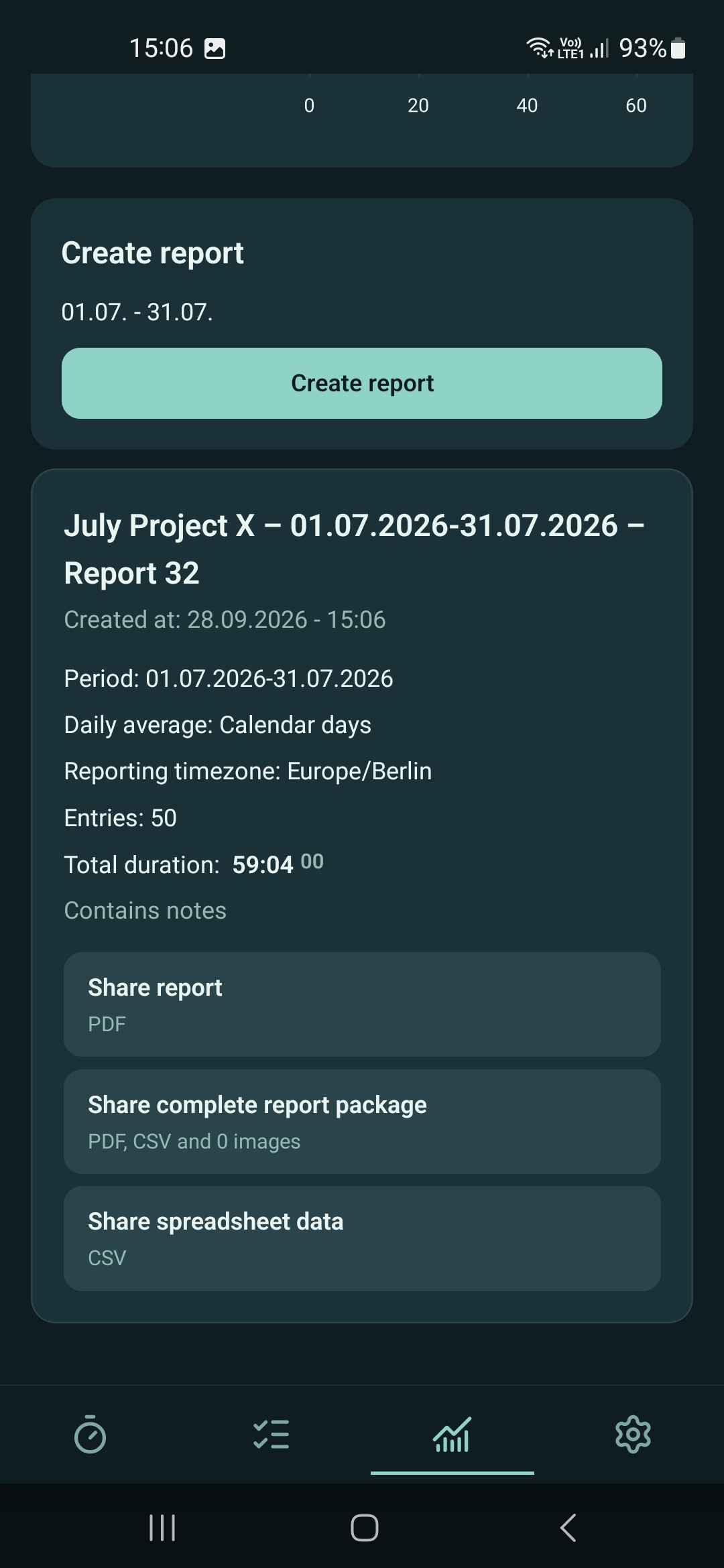
Reports are fixed snapshots of the tracked time that matches the active analysis filter.
Reports provide PDF, spreadsheet, and complete package formats for storage or sharing.
1. Report creation
Section titled “1. Report creation”The active analysis filter controls the period, lists, activities, tags, weekdays, and daily average mode.
Create report saves the current result as a fixed snapshot. Later changes to filters or time entries do not update the saved report.
When matching entries contain images, an optional image appendix is available for the PDF.
2. Report details
Section titled “2. Report details”- Report name: Combines the filter name, period, and report number.
- Created at: Shows when ZackZack created the snapshot.
- Period: Shows the start and end dates included in the report.
- Daily average: Shows whether the filter used calendar days or tracked days.
- Reporting timezone: Shows the timezone used for dates and calendar boundaries.
- Entries: Shows the number of time entries in the report.
- Total duration: Shows the combined tracked time.
- Notes status: Shows whether at least one included entry contains a note.
3. Sharing formats
Section titled “3. Sharing formats”- Share report: Shares the saved PDF.
- Share complete report package: Shares a ZIP with the PDF, CSV, and available report images.
- Share spreadsheet data: Shares the saved CSV file.
The image count reflects the saved snapshot. Images added later do not appear in an existing report package.
4. Saved report management
Section titled “4. Saved report management”ZackZack lists reports for the active filter, with the newest report first.
Pressing and holding a report opens selection mode for selecting and deleting saved reports.
Reports remain on the device without synchronization or inclusion in JSON backups.
Deleting an analysis filter also deletes the reports saved for that filter.
Common questions
Section titled “Common questions”Why does an old report not change?
Section titled “Why does an old report not change?”A report is a fixed snapshot. Changes to time entries or filter settings only affect reports created later.
What is the difference between the share actions?
Section titled “What is the difference between the share actions?”The PDF supports reading, the CSV supports spreadsheet work, and the complete package contains all available files.
Why does the complete package show zero images?
Section titled “Why does the complete package show zero images?”The report contained no available images at creation time.
What happens when an analysis filter is deleted?
Section titled “What happens when an analysis filter is deleted?”ZackZack also deletes the reports that belong to that filter.